

Orders workflow
The Orders workflow covers the standard lifecycle: build the order payload, validate it, submit it, and handle the response. The examples use the sandbox host; substitute the host for your environment (see the overview).
Lifecycle
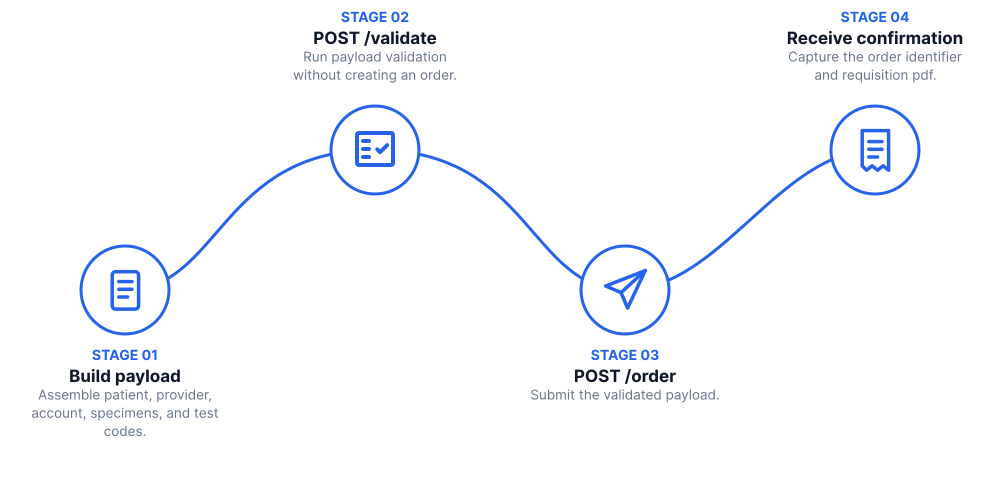
1. Build the order payload
An order describes the patient, the ordering provider, the account, the specimens, and the test codes. The full schema is in the Order Submission API reference. Reference materials:
- Billing Table for Certification (XLSX): required values for Client Bill, Patient Bill, Third Party, and Special Billing.
Field-format conventions
- Strings are case-sensitive. For most coded fields (test codes, source IDs, payer codes) Labcorp expects UPPERCASE.
- Dates use ISO 8601 (
YYYY-MM-DDorYYYY-MM-DDTHH:MM). - Specimen IDs are alpha characters (A, B, …, Z, AA, AB, …) and must be unique per order.
- Only the ASCII characters listed in the API reference are accepted in string fields.
sending_applicationandsending_facilitymust be a combination that is authorized for your account, otherwise the request is rejected with403.
Gender identity and sexual orientation
Send the patient's gender identity and sexual orientation in order.patient.gender_identities and
order.patient.sexual_orientations. Both are required when the patient's state is New Jersey. Each
accepts more than one response, using the coded values for
gender identity and
sexual orientation; for an OTH response, add explanatory
text in description.
2. Validate before you submit
POST /validate runs the same business-rule checks as POST /order without submitting the order.
It returns 200 OK with the order and a validationIssues array, even when the order has problems,
so check the severity of each issue: any issue with severity error would cause POST /order to
reject the order.
Validating first is optional. If you call POST /order directly, it runs the same checks, but most
of them don't stop the order: Labcorp reports the issues in validationIssues and submits the order
with the data you provided. Only issues with severity error cause the order to be rejected.
Code
3. Submit the order
Code
The request is processed synchronously and the response is returned when processing finishes:
workflowId: identifies this submission. Keep it when contacting support. It is also returned in theworkflowIdresponse header.requisitions: a dictionary keyed bysourceOrderUid. Labcorp may split one order into several requisitions (for example one per specimen, or separating cytology tests), and each entry carries the base64pdfrequisition to print and send with the specimen, abarcode, and thesourceOrderthat produced it.validationIssues: non-blocking issues (warnings and information) found while processing.notifications: present forSTATorders. STAT orders must also be reported to Labcorp customer service by phone.
You don't need to generate 2D barcodes: print the requisition PDF and barcode returned by
POST /order and send them with the specimen.
Advance Beneficiary Notice (ABN)
When an order is billed to a third party (bill_type of T) with a primary insurance payer code of
05 (Medicare), Labcorp evaluates whether an ABN is needed as part of order submission, so you
don't need to call the ABN Service for these orders. If an ABN is required, it is returned as a
base64 PDF in requisitions[].abn; present it to the patient and capture their selection. If the
ABN evaluation cannot be completed, the order is still accepted and no abn is returned.
To find out whether an ABN is needed before you submit, for example so the patient can sign it before the specimen is collected, call the ABN Service first.
Use 05 only for Original Medicare (Part B, including Railroad Medicare). Bill Medicare Advantage
plans as private insurance with their own payer code; see the Billing Table on
Resources.
Handling errors
| Status | Meaning |
|---|---|
400 | The body is not a JSON object, or the order failed validation. The response is an array of issues, each with severity, id, field, message, and attributes. |
401 | Authorization information is missing or invalid. |
403 | Access is denied, or the sending_facility and sending_application combination is not authorized for your account. |
500 | Internal server error. |
504 | Processing did not finish in time. The order may or may not have been accepted; check with Labcorp before resubmitting. |
Submissions are not idempotent: sending the same order twice creates two workflows. After acceptance, delivery of the order to Labcorp continues asynchronously and there is no callback to your system.
Related workflows
- AOE workflow: Ask-at-order-entry questions for specialty test types, including microbiology source and histology/pathology body site
- Outreach orders and On-demand orders: single-specimen orders that Labcorp assigns to a provider
- Order Modification: Add or cancel test codes on an existing order